Audit Universe & Library
The Audit Universe is the foundational building block of your audit program. It provides a centralized, governed registry of every auditable entity in your organization—business units, processes, applications, and regulatory domains—along with their associated risks and controls.
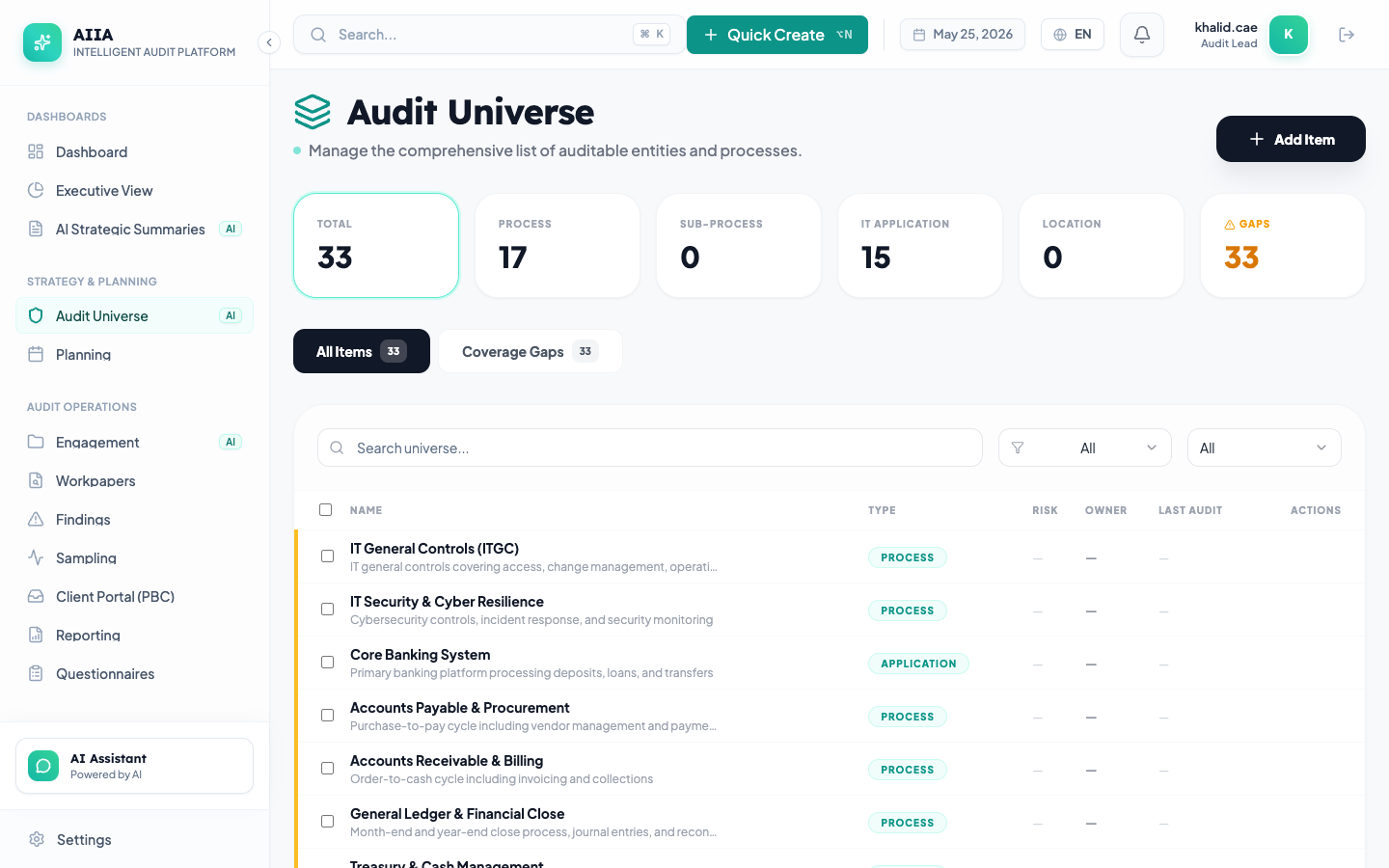
What Is the Audit Universe?
The Audit Universe is the master catalog of everything your internal audit function can—or should—audit. Each item in the universe represents an auditable entity with associated risk ratings, control mappings, last audit dates, and coverage metrics.
The Library complements the universe by providing reusable building blocks:
- Risks — categorized risk statements with inherent/residual ratings
- Controls — control activities mapped to risks with effectiveness ratings
- Risk-Control Mappings — the linkages between risks and their mitigating controls
Together, these components form a complete risk-and-control framework that drives risk-based audit planning.
Key Capabilities
| Capability | Description |
|---|---|
| Entity Registry | Catalog all auditable entities with structured metadata |
| Risk Assessment | Attach quantified risk ratings (likelihood × impact) to entities |
| Control Mapping | Link controls to risks with many-to-many relationships |
| Coverage Tracking | Automatically track when each entity was last audited |
| Hierarchy Support | Nest entities under parent business units or processes |
| Bulk Import | Upload entities, risks, and controls via CSV/Excel |
| AI-Assisted | AI suggests risk ratings based on historical data and industry benchmarks |
| Search & Filter | Full-text search with faceted filtering by type, risk level, owner, and status |
How It Connects to Other Modules
- Annual Planning pulls universe items to build risk-based audit plans
- Engagements link to universe items for scope definition
- Compliance maps framework controls to library controls
- Monitoring uses universe items as KRI data sources
- Fieldwork uses library test procedures for workpaper execution
- Findings reference library controls when documenting exceptions
Entity Types
The universe supports the following entity categories:
| Type | Examples | Icon |
|---|---|---|
| Business Unit | Finance, HR, IT, Operations | 🏢 |
| Process | Procure-to-Pay, Hire-to-Retire, Order-to-Cash | ⚙️ |
| Application | SAP, Oracle HCM, Salesforce | 💻 |
| Regulatory Domain | NCA ECC, PDPL, SOX, GDPR | 📋 |
| Project | Digital Transformation, ERP Migration | 📁 |
| Location | Riyadh HQ, Jeddah Branch, Remote | 📍 |
Risk Rating Methodology
AIIA uses a 5×5 risk matrix by default (configurable per organization):
| Impact 1 | Impact 2 | Impact 3 | Impact 4 | Impact 5 | |
|---|---|---|---|---|---|
| Likelihood 5 | 🟡 Medium | 🟠 High | 🔴 Critical | 🔴 Critical | 🔴 Critical |
| Likelihood 4 | 🟡 Medium | 🟡 Medium | 🟠 High | 🔴 Critical | 🔴 Critical |
| Likelihood 3 | 🟢 Low | 🟡 Medium | 🟡 Medium | 🟠 High | 🔴 Critical |
| Likelihood 2 | 🟢 Low | 🟢 Low | 🟡 Medium | 🟡 Medium | 🟠 High |
| Likelihood 1 | 🟢 Low | 🟢 Low | 🟢 Low | 🟡 Medium | 🟡 Medium |
The resulting risk score (1–25) determines the entity's priority for audit coverage.
User Interface Overview
Universe List View
The universe list displays all auditable entities with:
- Search bar — full-text search across name, description, and tags
- Filter panel — filter by entity type, risk level, owner, last audit date
- Sort options — sort by name, risk score, last audit date
- Bulk actions — select multiple items for bulk operations
- Quick actions — edit, archive, or view details from the list
Entity Detail View
Clicking an entity opens the detail panel with tabs:
| Tab | Content |
|---|---|
| Overview | Entity metadata, description, owner, dates |
| Risks | Associated risk statements with ratings |
| Controls | Mapped controls with effectiveness status |
| Audit History | Past engagements that covered this entity |
| Documents | Attached reference documents |
| Activity | Audit log of all changes to this entity |
AI Integration
The AI companion assists with the Audit Universe in several ways:
| Feature | How It Helps |
|---|---|
| Risk Suggestion | "Suggest risks for this business unit based on industry standards" |
| Coverage Analysis | "Which universe items haven't been audited in 18 months?" |
| Duplicate Detection | AI flags potential duplicate entries when creating new items |
| Description Enhancement | AI helps refine entity descriptions for clarity |
All AI suggestions in the Audit Universe require human review and explicit "Apply" action before changes are committed. Every AI interaction is logged in the audit trail.
Getting Started
- Create Universe Items → — Add your first auditable entities
- Manage Risks → — Attach risk assessments to entities
- Map Controls → — Link controls to risks
- Field Reference → — Complete field-by-field documentation
- Permissions → — Who can do what in this module
Related Documentation
- Annual Planning — uses universe items for plan creation
- Engagements — links to universe items for scoping
- Compliance Frameworks — maps to library controls
- Risk Glossary — risk terminology reference