How-To: Create Universe Items
Learn how to add auditable entities—business units, processes, applications, and regulatory domains—to your Audit Universe.
Prerequisites
- You must have the Auditor, Manager, or CAE role
- At least one business unit must exist in your organization hierarchy (created during onboarding)
Method 1: Quick Create
Step 1 — Navigate to the Audit Universe
Click Universe in the left sidebar to open the universe list view.
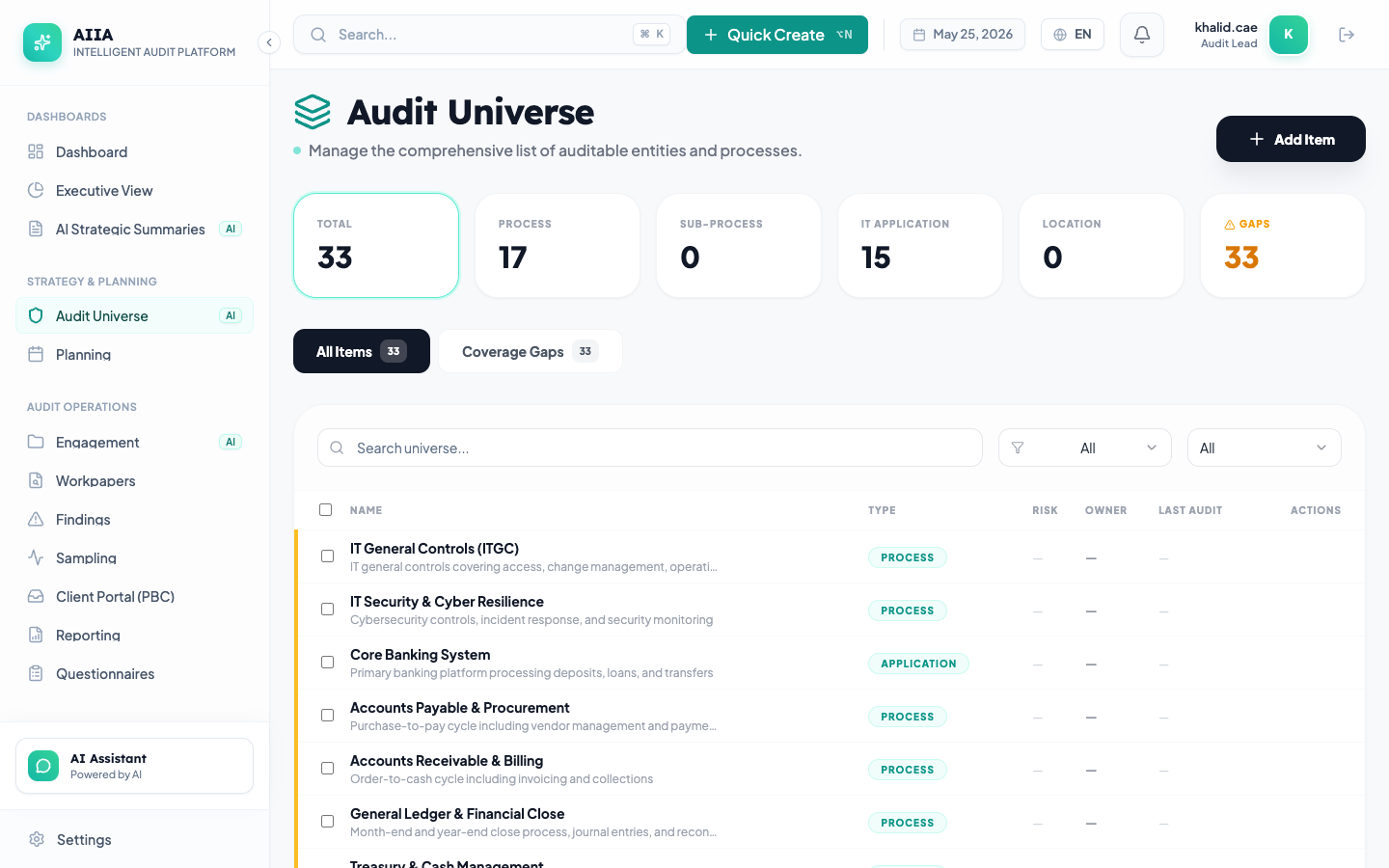
Step 2 — Click "New Item"
Click the + New Item button in the top-right corner.
Step 3 — Fill in Entity Details
Complete the following fields in the creation form:
| Field | Required | Description |
|---|---|---|
| Name | ✅ | Descriptive name for the auditable entity (e.g., "Procure-to-Pay Process") |
| Type | ✅ | Select from: Business Unit, Process, Application, Regulatory Domain, Project, Location |
| Description | Recommended | Detailed description of the entity's scope and boundaries |
| Parent Entity | Optional | Select a parent entity for hierarchical grouping |
| Owner | Recommended | The business owner responsible for this entity |
| Risk Level | Optional | Initial risk assessment (Low, Medium, High, Critical) — can be refined later |
| Tags | Optional | Custom tags for filtering and organization |
Step 4 — Save
Click Save to create the entity. You will be redirected to the entity detail page where you can:
- Add risk assessments
- Map controls
- Attach documents
After saving, the new entity appears in the universe list. The entity card shows the name, type, risk level, and "Last Audited: Never" if no prior engagements exist.
Method 2: AI-Assisted Creation
Step 1 — Open AI Companion
Click the AI Assistant icon in the bottom-right corner of any page.
Step 2 — Describe What You Want
Type a natural language request:
- "Create a universe item for the Finance department's Accounts Payable process"
- "Add SAP S/4HANA to our application inventory"
- "Register all departments under the Riyadh headquarters"
Step 3 — Review AI Suggestion
The AI generates a draft entity with:
- Suggested name and description
- Recommended entity type
- Suggested initial risk level based on industry benchmarks
- Proposed risk statements
Step 4 — Apply or Modify
- Click Apply to create the entity as suggested
- Click Edit to modify before creating
- Click Reject to discard the suggestion
The AI suggestion is displayed as a diff showing exactly what will be created. You must explicitly confirm before any data is written. The AI interaction is logged in the audit trail.
Method 3: Bulk Import via CSV
Step 1 — Download Template
Navigate to Universe → click the ⋮ Menu → select Import → click Download Template.
The template CSV includes these columns:
name,type,description,parent_entity,owner,risk_level,tags
"Accounts Payable","Process","End-to-end AP workflow","Finance","Ahmed Al-Rashid","High","finance,payments"
"SAP S/4HANA","Application","Core ERP system","IT","Sara Hassan","Critical","erp,finance"
Step 2 — Fill In Your Data
Populate the CSV with your entities. Tips:
- type must be one of:
Business Unit,Process,Application,Regulatory Domain,Project,Location - parent_entity should match the exact name of an existing entity
- risk_level must be:
Low,Medium,High, orCritical - tags are comma-separated within the field
Step 3 — Upload
Click Import → Upload CSV → select your file.
AIIA validates the file and shows:
- ✅ Valid rows (ready to import)
- ⚠️ Warnings (e.g., duplicate names, unknown parent)
- ❌ Errors (e.g., invalid type, missing required fields)
Step 4 — Confirm Import
Review the validation summary and click Import All Valid to proceed.
After import, all valid entities appear in the universe list. Any warnings or errors are listed in a downloadable report for correction and re-import.
Best Practices
- Use a consistent naming convention — e.g., "[Department] - [Process Name]" for processes
- Always set a parent entity — hierarchical organization enables better coverage analysis
- Assign owners — ownership drives accountability and enables filtering in planning
- Tag generously — tags make filtering and grouping much more powerful
- Don't over-granulate — each entity should represent a meaningful, auditable unit of work
- Review annually — archive obsolete entities and add new ones as the organization evolves
Troubleshooting
| Issue | Cause | Solution |
|---|---|---|
| Can't find the "New Item" button | Insufficient permissions | Contact your admin to grant the universe:create permission |
| Import fails with "Invalid parent" | Parent entity doesn't exist | Create the parent entity first, then re-import |
| Duplicate name warning | Entity with same name exists | Check if the entity already exists; if so, update it instead |
| AI suggestion seems incorrect | AI uses industry defaults | Review and modify the suggestion before applying |
Next Steps
- Manage Risks → — Add risk assessments to your entities
- Map Controls → — Link controls to risks